Encrypt Sensitive Inputs in the Inventory File
Ansible Vault can be used to encrypt properties to be populated in the inventory file, as described in Encrypting Sensitive Information. Whether properties should be encrypted in the inventory file depends on the individual deployment and how and where the file is to be stored. For example, if the inventory file is very securely stored with access to very few authorized users, you may not need to encrypt any information. It also depends on the property itself, for example you may choose to encrypt passwords but not server names. In addition, not all passwords are external. The only external password is the wso2is_admin_password property. The rest of the credentials are either only used by installer or by the applications for internal communications. For example, any password property with _jdbc_ in the middle is internal and used by the application to authenticate against the database.
To encrypt properties either create an Ansible Vault file, store sensitive data in it and reference it from the inventory file or individually encrypt sensitive strings for inclusion directly in the inventory file:
Store Properties in an Encrypted Ansible Vault File
To create or edit existing vault files (encrypted files), you can run the following command(s):
-
ansible-vault create --vault-password-file=~/.vaultpwd <vault_file>Ansible retrieves the password from the password file and opens the new file in the chosen editor. Once the file is created, it is saved as an encrypted file.
The editor is defined by the
$EDITORenvironment variable. -
ansible-vault create --ask-vault-pass <vault_file>Ansible prompts the user
 A person with the capability to log in to the CMP GUI software, such as a customer service advisor or agent. for the vault password. If it is correct, it opens the new file in the chosen editor. Once the file is created, it is saved as an encrypted file.
 -
ansible-vault edit --vault-password-file=~/.vaultpwd <vault_file>Ansible retrieves the password from the password file, decrypts the encrypted file and opens a temporary file in the chosen editor .Once the file is edited, it is re-encrypted and saved as an encrypted file.
-
ansible-vault edit --ask-vault-pass <vault_file>Ansible prompts the user for the vault password. If it is correct, it decrypts the encrypted file and opens a temporary file in the chosen editor. Once the file is edited, it is re-encrypted and saved as an encrypted file.
The decrypted ansible vault file is a standard YAML file which is very like the standard Ansible vars file, for example:

Once the vault file is saved and you quit the editor, ansible-vault encrypts the content of the file, for example:
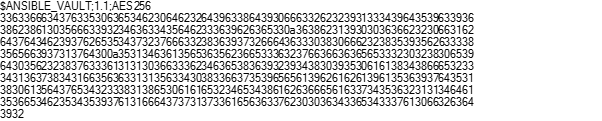
The variables in the vault file can be referenced directly in the plays. Ansible will determine if there are any encrypted files available in the directories where the vars files are expected.
Encrypting Individual Properties
To encrypt an individual property run the following command (again using either --vault-password-file or the --ask-vault-pass parameter to feed the password to the program):
When the string that you’re about to encrypt contains dollar sign, at sign, or exclamation mark characters ($, @’or ! ), you must either wrap the string in single quotes or run the ansible-vault command without providing the value to encrypt as part of the command. In the latter case, the ansible-vault command will get the value that it should encrypt from the standard input. You can finish input by pressing Ctrl-D keys twice.
In either case the ansible-vault program prints the encrypted value onto the screen. The value will look like the following:

To place the value to the inventory or the variables file you must keep indentation of the encrypted lines the same. So, if the above encrypted value has to be set as a value of the jdbc_password property it should be in the YAML inventory file as follows:

Important
There is a single space between a colon character that separates the value from the property name as well as a single space between the
!vaultstring and the pipe (ǀ) character that is used to define a multiline property in YAML. Then every subsequent line in the multiline property value must have the same indentation shifted few characters to the right of the property name indentation.
For more information, see https://docs.ansible.com/ansible/latest/user_guide/vault.html.
The variable files must be stored in the correct location as required by Ansible. For more information see: